AudioMator
The best mate of your audio library.
A local-first desktop editor for cleaning audio metadata with precision.
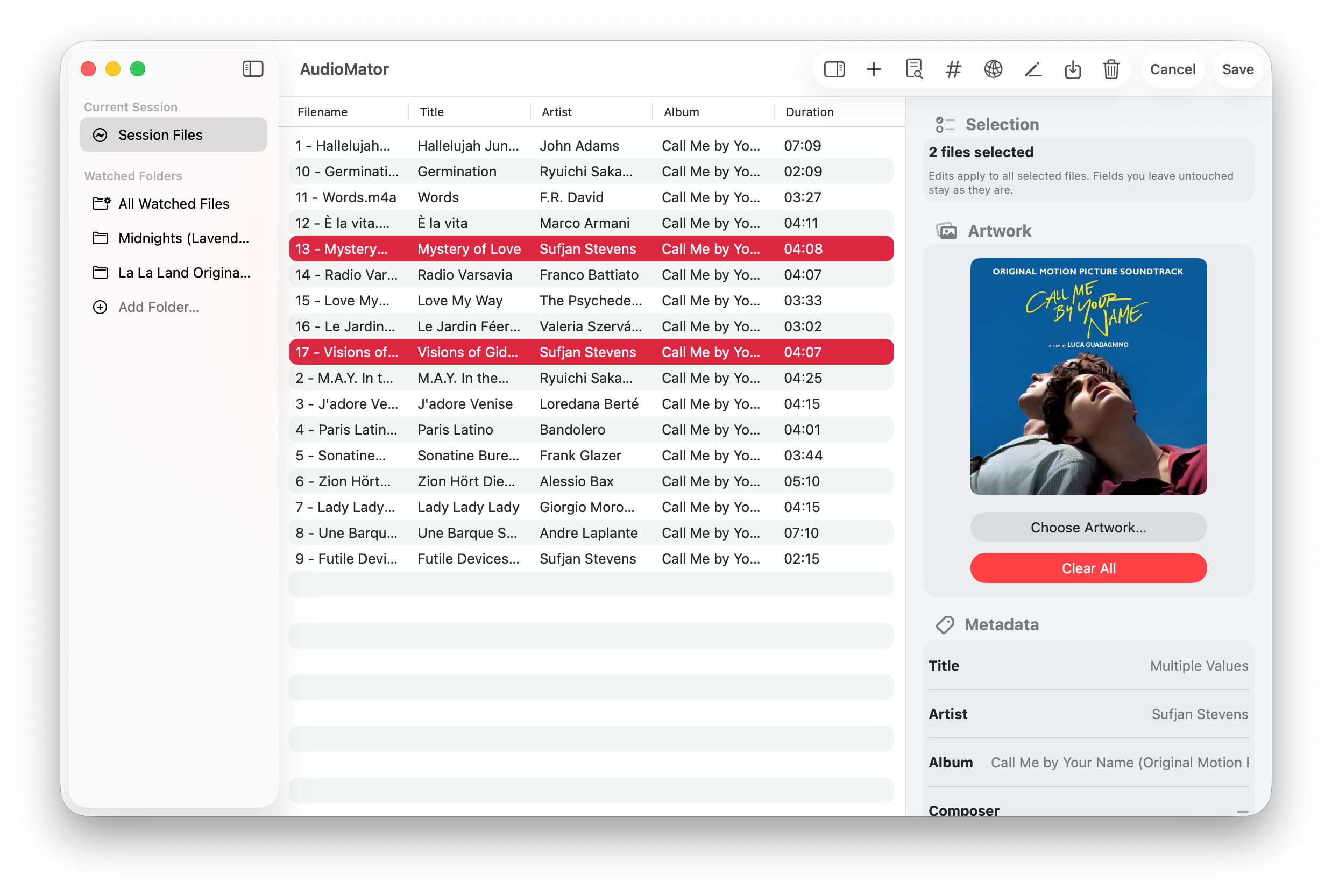
3 panes
Sidebar, file list, and inspector visible together.
14 fields
Core metadata fields plus artwork editing in the current build.
23 formats
Import and inspection support across common local audio containers.
Batch tools
Renumbering, file rename, Finder reveal, and tag cleanup utilities.
Product Detail
Desktop metadata cleanup without the usual ambiguity.
AudioMator is built for people who still keep real audio files on disk and occasionally need to fix them by hand. Instead of hiding everything behind a batch wizard, it keeps the sidebar, the file list, and the inspector visible together. That makes it easier to compare tracks, spot inconsistencies, and save changes with confidence.
Workflow
The interface is organized around the three decisions you make over and over.
01
Sidebar
Choose the source you want to work on.
Use Current Session for one-off cleanup, or keep watched folders pinned for libraries you revisit often.
- Temporary sessions for quick edits
- Persistent watched folders across launches
02
File List
Review the set before you edit anything.
The middle table is where you sort tracks, compare rows, reorder files, and decide what needs attention.
- Sortable columns and multi-select
- Visible order can drive track renumbering
03
Inspector
Edit fields with context still in view.
The inspector handles single-file edits, mixed selections, artwork changes, and raw metadata review without hiding the library around it.
- Field editing, artwork, and technical details
- Raw tag inspection before save
Capabilities
A compact toolset aimed at the parts of metadata work that usually get tedious.
01
Edit metadata deliberately
AudioMator focuses on exact edits rather than automation guesses, so common library fixes stay readable.
- Single-file and shared multi-file editing
- Mixed-value placeholders where selections differ
- Write feedback for success, warning, partial-save, and failure states
02
Inspect before you write
The app gives you enough evidence to confirm what is actually stored in a file before committing changes.
- Tag Inspector output from TagLib and AVFoundation
- Technical fields like duration, bitrate, sample rate, and format
- Artwork, IDs, and additional metadata when present
03
Handle repetitive cleanup in batches
When a whole folder needs the same kind of housekeeping, the utility tools stay close to the main workflow.
- Renumber tracks from the current visible order
- Rename files from metadata tokens while preserving extensions
- Reveal in Finder, copy paths, and erase supported tags
04
Use MusicBrainz only as reference
MusicBrainz is there when you need outside context, but it does not change the app’s local-first editing model.
- Open a dedicated browser window when needed
- Seed searches from the current file selection
- Keep actual edits inside AudioMator on your Mac
Foundation
Native macOS tooling underneath, practical format coverage on top.
Stack
SwiftUI
Drives the native macOS interface, including the three-pane layout, sheets, toolbar commands, and inspector behavior.
TagLib Bridge
Handles local metadata reading and writing through the app’s bundled bridge layer.
AVFoundation
Adds format-aware inspection and technical metadata alongside the write path.
Formats
23 formats
Format support is aimed at practical library maintenance: inspect widely, edit the common formats that people actually keep and tag by hand.
Final Note
“Files stay on your Mac.”
AudioMator keeps the core workflow local: choose files, inspect what is there, make the edits you intend, and write them back on your own machine.